having some strange issues with the routers in AS5100, as shown in the diagram. Dotted lines indicate a neighbor adjacency.
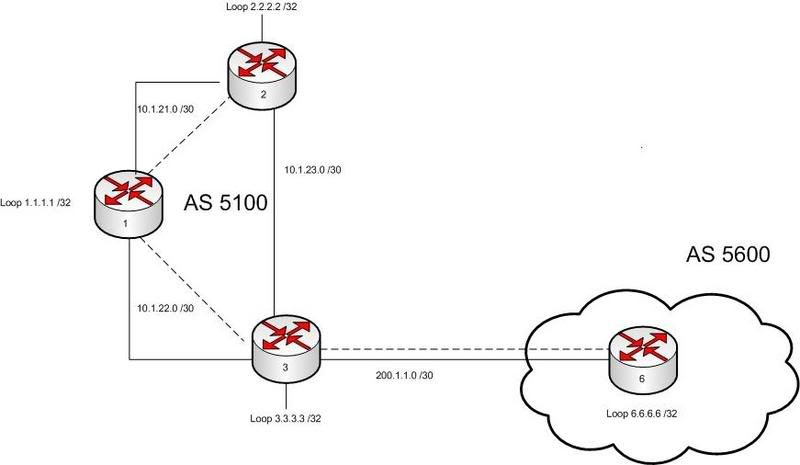
so i have added the 33.33.33.0/24 network to R3 and the 22.22.22.0/24 network to R2.
R1 is configured as a route reflector, the problem is that somehow R3 is picking up the network 22.22.22.0/24 with a next hop of 2.2.2.2 but i have no idea it is getting the next hop of 2.2.2.2 as I have not configured any next-hop-self commands on R1.
R2 does the opposite, it learns of the 33.33.33.0 network but its not marked as best because it has no route to the next hop of 3.3.3.3. If i add the next-hop-self command for R1 this does not change anything.
here are the relevant configs:
R1 Running config:
!
interface Loopback1
ip address 1.1.1.1 255.255.255.255
!
interface Serial1/0
ip address 10.1.21.1 255.255.255.252
ip pim sparse-dense-mode
no fair-queue
serial restart-delay 0
!
interface Serial1/1
ip address 10.1.22.1 255.255.255.252
ip pim sparse-dense-mode
serial restart-delay 0
!
router bgp 5100
no synchronization
bgp log-neighbor-changes
neighbor 2.2.2.2 remote-as 5100
neighbor 2.2.2.2 update-source Loopback1
neighbor 2.2.2.2 route-reflector-client
neighbor 2.2.2.2 next-hop-self
neighbor 3.3.3.3 remote-as 5100
neighbor 3.3.3.3 update-source Loopback1
neighbor 3.3.3.3 route-reflector-client
no auto-summary
!
ip route 2.2.2.2 255.255.255.255 10.1.21.2
ip route 3.3.3.3 255.255.255.255 10.1.22.2
R1 BGP table:
Network Next Hop Metric LocPrf Weight Path
*>i22.22.22.0/24 2.2.2.2 0 100 0 i
*>i33.33.33.0/24 3.3.3.3 0 100 0 i
R1#
R1 BGP Neighbour table:
Neighbor V AS MsgRcvd MsgSent TblVer InQ OutQ Up/Down State/PfxRcd
2.2.2.2 4 5100 99 102 5 0 0 01:17:34 1
3.3.3.3 4 5100 96 97 5 0 0 01:26:55 1
R1#
So everything looks good on R1. Notice i only have next-hop-self configured on the 2.2.2.2 neighbor.
R2 Running Config:
!
interface Loopback1
ip address 2.2.2.2 255.255.255.255
!
interface Loopback22
ip address 22.22.22.22 255.255.255.0
!
interface Serial1/0
ip address 10.1.21.2 255.255.255.252
ip pim sparse-dense-mode
no fair-queue
serial restart-delay 0
!
interface Serial1/2
bandwidth 1200
ip address 10.1.23.1 255.255.255.252
ip pim sparse-dense-mode
serial restart-delay 0
!
!
router bgp 5100
no synchronization
bgp log-neighbor-changes
network 22.22.22.0 mask 255.255.255.0
neighbor 1.1.1.1 remote-as 5100
neighbor 1.1.1.1 update-source Loopback1
no auto-summary
!
ip route 1.1.1.1 255.255.255.255 10.1.21.1
ip route 4.4.4.4 255.255.255.255 100.1.1.2
R2 BGP Table
Network Next Hop Metric LocPrf Weight Path
*> 22.22.22.0/24 0.0.0.0 0 32768 i
* i33.33.33.0/24 3.3.3.3 0 100 0 i
R2#
Notice here that it has a valid route to the 33.33.33.0 network but its not best since it has no idea how to get to 3.3.3.3. (even though next-hop-self is on R1)
R2 Neighbor Table:
Neighbor V AS MsgRcvd MsgSent TblVer InQ OutQ Up/Down State/PfxRcd
1.1.1.1 4 5100 105 102 2 0 0 01:20:20 1
R2#
R3 Running config:
interface Loopback1
ip address 3.3.3.3 255.255.255.255
!
interface Loopback33
ip address 33.33.33.33 255.255.255.0
!
!
interface Serial1/1
ip address 10.1.22.2 255.255.255.252
ip pim sparse-dense-mode
serial restart-delay 0
!
interface Serial1/2
bandwidth 1200
ip address 10.1.23.2 255.255.255.252
serial restart-delay 0
!
interface Serial1/3
ip address 200.1.1.1 255.255.255.252
ip pim sparse-dense-mode
serial restart-delay 0
!
router bgp 5100
no synchronization
bgp log-neighbor-changes
network 33.33.33.0 mask 255.255.255.0
neighbor 1.1.1.1 remote-as 5100
neighbor 1.1.1.1 update-source Loopback1
no auto-summary
!
ip route 0.0.0.0 0.0.0.0 200.1.1.2
ip route 1.1.1.1 255.255.255.255 10.1.22.1
ip route 6.6.6.6 255.255.255.255 200.1.1.2
R3 BGP Table
Network Next Hop Metric LocPrf Weight Path
*>i22.22.22.0/24 2.2.2.2 0 100 0 i
*> 33.33.33.0/24 0.0.0.0 0 32768 i
R3#
This is the weird bit.... R3 has a best and valid route to 22.22.22.0 somehow using 2.2.2.2 as the next hop, even though it has no route to 2.2.2.2. I cant ping 2.2.2.2.
R3 BGP Neighbor table
Neighbor V AS MsgRcvd MsgSent TblVer InQ OutQ Up/Down State/PfxRcd
1.1.1.1 4 5100 103 102 5 0 0 01:32:49 1
R3#
so anyone got some ideas on whats going on here?
thanks.

