Compare cert salaries and plan your next career move
Forsaken_GA wrote: » fwbuilder
jibbajabba wrote: » Holy *bleep* - that's awesome ps: tried to rep, but can't, given too many lately apparently
Forsaken_GA wrote: » VMWare has allowed me to go rather nutso with the expansion of my lab...
Asif Dasl wrote: » My home router - Cisco CRS-3 My main desktop - Intel i386DX-25Mhz, 2Mb RAM, 100Mb Hard drive, 3.1 WfWG (Note, it's a DX!! WITH custom water cooling) Spare lab PC / Folding@Home - K computer, SPARC64 (I've got 2, in case the other one breaks down)Gold iPad 5 year diesel generator with backup nuclear fusion power plant Bomb-proof nuclear bunker (much like this one)
onesaint wrote: » So, you're running some 30 VMs in that setup? Man, that's some fantastic home network. When you implement a technology, do you install a few times? Or is it something like PF where you have some 10 installations of it? I guess what I'm getting at is, is it "set it and forget it" or whats the methodology behind your learning by implementation?
alan2308 wrote: » Shens! You can't fold on a SPARC.
Everyone wrote: » I need to figure out how the "Guest Wireless" feature on my new Cisco/Linksys EA4500 actually works. Haven't tried it out yet. I know it has a captive portal built into it, and it says "Guest Access provides visitors to your home with Internet access without giving them access to your computers or personal data.", but there are no settings for putting guest access on a different VLAN, so I'm not sure how it is keeping them separate. Trying to avoid having to run 2 different wireless routers.
Forsaken_GA wrote: » Well, if it works anything like the Apple Airport Extreme, there's another antenna in the AP and you setup an entirely different SSID for the guest access. The AP itself keeps the wireless traffic segregated. Which isn't to say I trust it. I run the Airport as my 802.11n AP, and keep my old Linksys around to provide 802.11g to guests, unless I know them well enough, at which point I provide them with the password to the Airport. When I finally get off my ass and implement 802.11x with certificate based authentication, they just might have to stay on the crappy AP
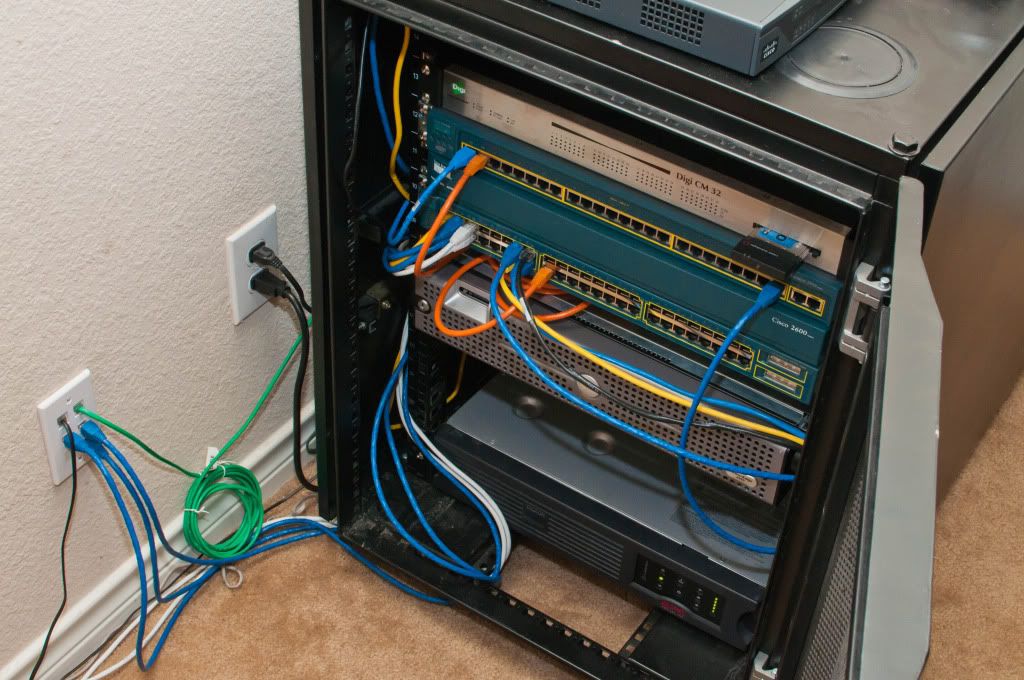
rack-mounted desktop system
Forsaken_GA wrote: » VMWare has allowed me to go rather nutso with the expansion of my lab. Physical gear (not counting my CCIE lab gear or access devices like laptops, ipads, etc) Cisco 3725 (Edge Router) Cisco 3550 (Access/Distribution Switch) Apple Airport Extreme (Trusted Users AP) Linksys AP (Not so trusted users AP) Synology DS1511+ (NAS) (2) HP DL385 g2 with dual quad-core and 16 gigs each (ESXi hosts) Netgear Switch (cheapest thing I could find with gig ports that supported Jumbo frames, used as the backend storage switch for my ESXi hosts and my Synology for iSCSI and vMotion traffic) As far logical setup goes - Each VLAN has dual PFSense firewalls in front of it, providing redundancy through CARP, not going to list it on each vlan because it's tedious. Each firewall participates in routing with the 3550 via RIP, since getting OSPF running on PFSense is..... a chore. DMZ: 2 DNS servers (Debian with PowerDNS) Web Server (Debian) Reverse Proxy Server (used to access internal sites externally, used to overcome single IP on residential internet services while still having hosts on different IP's running web based services. Beats the snot out of having to maintain a crapload of NAT port forwards. Running Scientific Linux) Corporate Services VLAN: LDAP server (CentOS) 2 Database servers (Mysql, Centos, Master/Slave configuration) Wiki (Centos, running Confluence) Fileserver (Serving up CIFS/NFS, Debian) Backup server (Debian, running rsync to all of the boxes) Repository Server (CentOs. Running Spacewalk for updates to CentOS/Scientific based hosts, mirroring a Debian repository for Debian based hosts) PKI Server (Scientific Linux, encrypted filesystems, runs my Certificate Authority, as all services that can be secured via certificate are. Normally powered down unless I have a need for it) Log Retention server (Debian, running Splunk) Webserver (Debian, runs intranet services like my ticketing system, etc) Proxy Server (Debian, running Squid) Development VLAN: Webserver (Debian) Database server (Centos) (These two are where I try out new software prior to deployment on other servers to see if I like it, if it will fit in, etc) Engineering VLAN: Nagios host (Debian) Engineering Services (IPPlan, PowerAdmin for DNS management, Rancid for network config backups, Netflow collection, etc) Graphing/Trending (Debian, runs things like Cacti, Smokeping) Bastion Host (OpenBSD, this box is the only one that's externally accessible via SSH, and the only box that's allowed access to everything in the network) Corporate Users VLAN: This is where all the 'normal' users on my network go, and where the Airport Extreme lives Guest VLAN: This is where everyone else goes. Like 12 year old children who don't know not to click on pop ups. And people who come over and want to use my Wireless. This PFsense firewalls guarding this VLAN use the Captive Portal feature (local authentication, not tied to anything on the backend) to prevent unauthorized use. This vlan is also policed to 256k up/down, so it's fine for web surfing (without streaming) and checking email, but not much else In addition to the home lab, I rent a VPS from Linode that runs Debian. The 3725 runs an IPIP tunnel to the Linode, and they run RIP with each other (they used to run BGP, but Linode decided to start filtering that... was not happy), so the Linode is logically a part of my internal network. The Linode also functions as my email server, since alot of folks don't like IP's from residential IP space. Given it's placement, it's also perfect as my VPN server. It runs OpenVPN, and I VPN into it, and thanks to the tunnel, it's like I have local access to my internal network. The linode also have native ipv6 access, and the 3725 maintains an ipv6 tunnel via Hurricane Electric. This allows me to bypass networks which have heavy lockdown on ipv4, but totally forgot to account for ipv6, and thus retain access to my internal network over the public internet. Post CCIE lab migration plans include the following: Replace LDAP server with AD domain controller. Already have a mockup as proof of concept, just don't have the time to actually migrate all of the hosts. Implement Exchange. The Linode runs Postfix, but down the line I'd like to use it as an email gateway instead of doing IMAP locally. I know it's possible to have postfix handoff received mail to Exchange for processing, I just don't know how to implement it. Again, the hold up here is a lack of time, CCIE is paramount at the moment, so it gets the free time Implement Lync server - Just because I feel like it Migrate entire internal network to native ipv6. The 3550 is the hold up there, as it doesn't support ipv6. Once I'm finished with the lab, one of my two 3560's will be tasked for that replacement, and then the migration will begin. I'll implement a DNS64 server to handle DNS proxying. I haven't quite decided what 6 to 4 translation mechanism I'm going to be using yet. So yeah, I'm a big nerd, and most of what I do for fun, people want to get paid for. Of course, the entire point is that I will be getting paid for it - down the line.
N2IT wrote: » Here is my network. Really advanced.
MAC_Addy wrote: » Here's mine. Though, it's not all being utilized. My fiancee and I have talked about doing some type of ticketing system to keep track of my house-work including hers. Just haven't even looked into this yet. I should be getting some servers setup within the next few months, the thought of setting up my own personal exchange server really interests me. Just don't know the best route to take on this.
onesaint wrote: » @Linuxracr: Ah, you're looking at desktop chassis. I was thinking of something like this (but don't want to drop 2k!):IsoBox Studio - Keeps Studio Computer Equipment Quiet and Cool I'd like to be able to stick my servers and Cisco gear into something like that.
mapletune wrote: » how are you guys mounting your rack equipment? I looked all over the web and couldn't really find people with the same question as I have... haha I mean, the closest i found was someone asking if they could mount servers only by the rack ears and people responded, "don't take the chance, use rails, or front and back posts, etc." But yea... for routers and switches do we only need to screw them on by the front ears? By that i mean, is the weight of rack equipments supported by ears attached to only the front panel? cuz that would create a lot of moment (torque) on that single point of support.... [Edit] Apologize in advanced if this question is unbearably stupid =p
Compare salaries for top cybersecurity certifications. Free download for TechExams community.